Turn play-by-play into data-driven scouting reports — spray charts,
player cards, damage reports, and export-ready game plans.
The numbers are organized for you. You make the decisions.
One annual license for your entire baseball or softball program.
Opponent IQ Pro
$399.99/year
Less than $34 per month for scouting reports, IQ Capture, pitching, My Team IQ, and IQ Prospects.
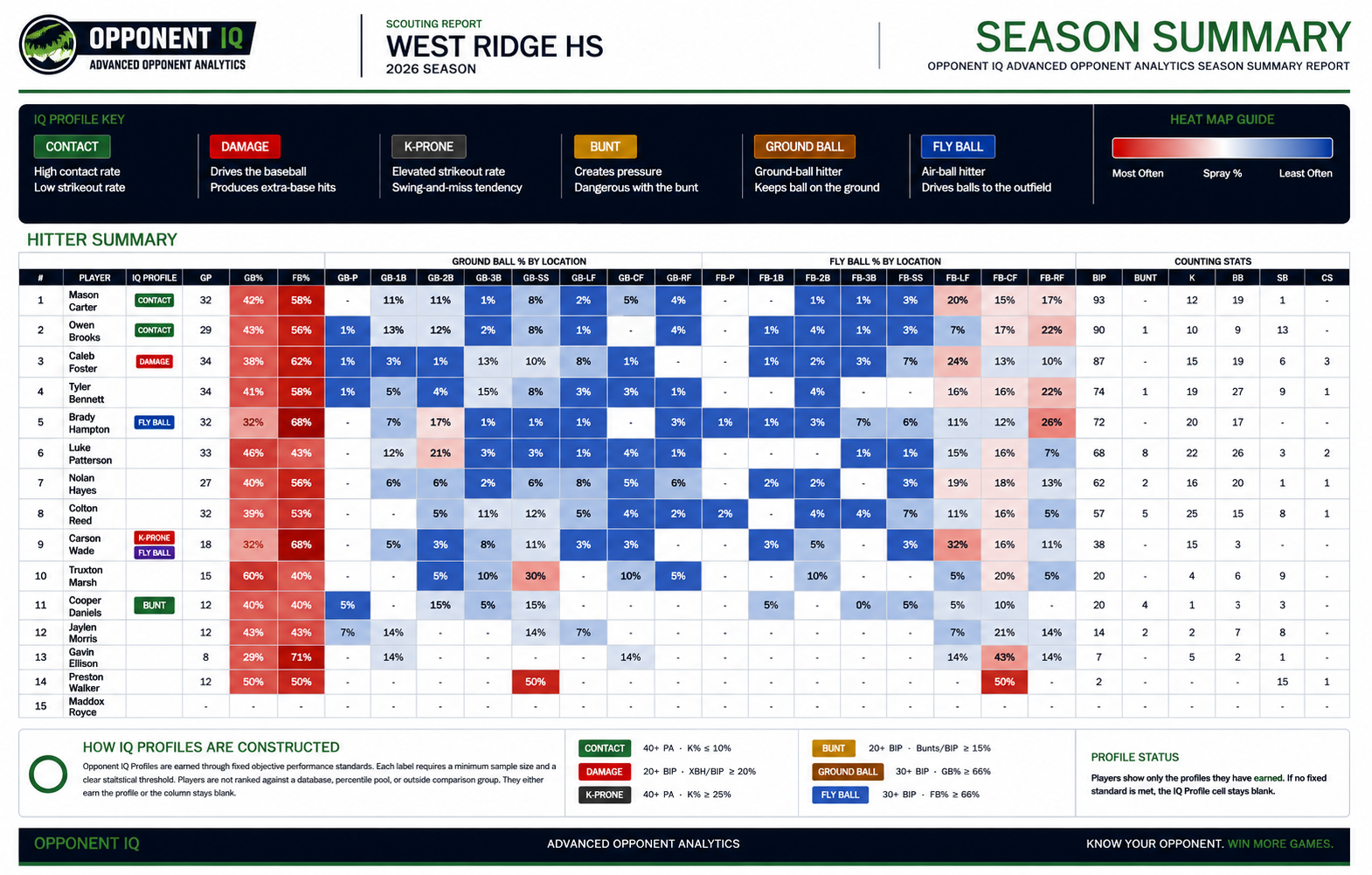
Season Summary Reports
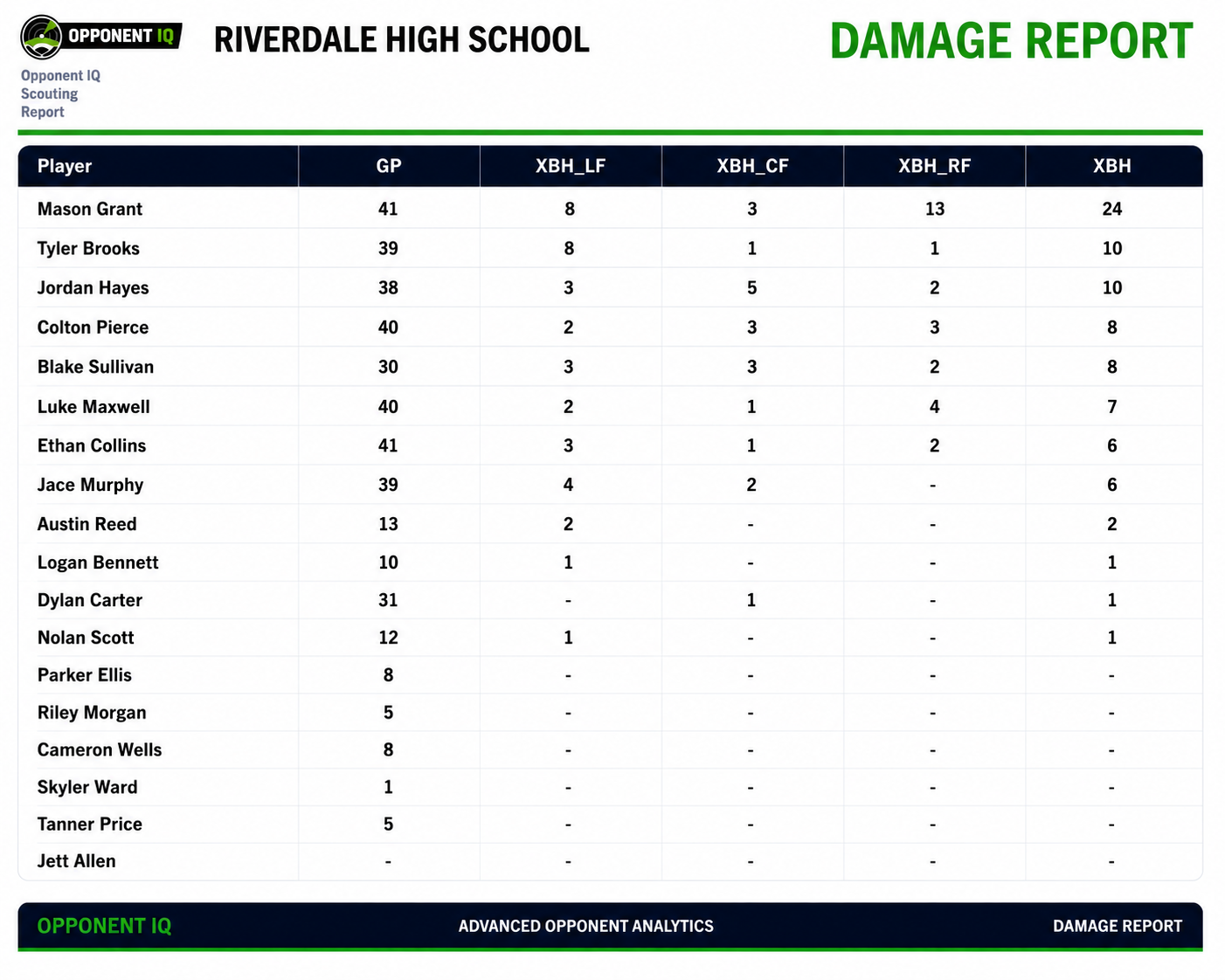
Damage Reports
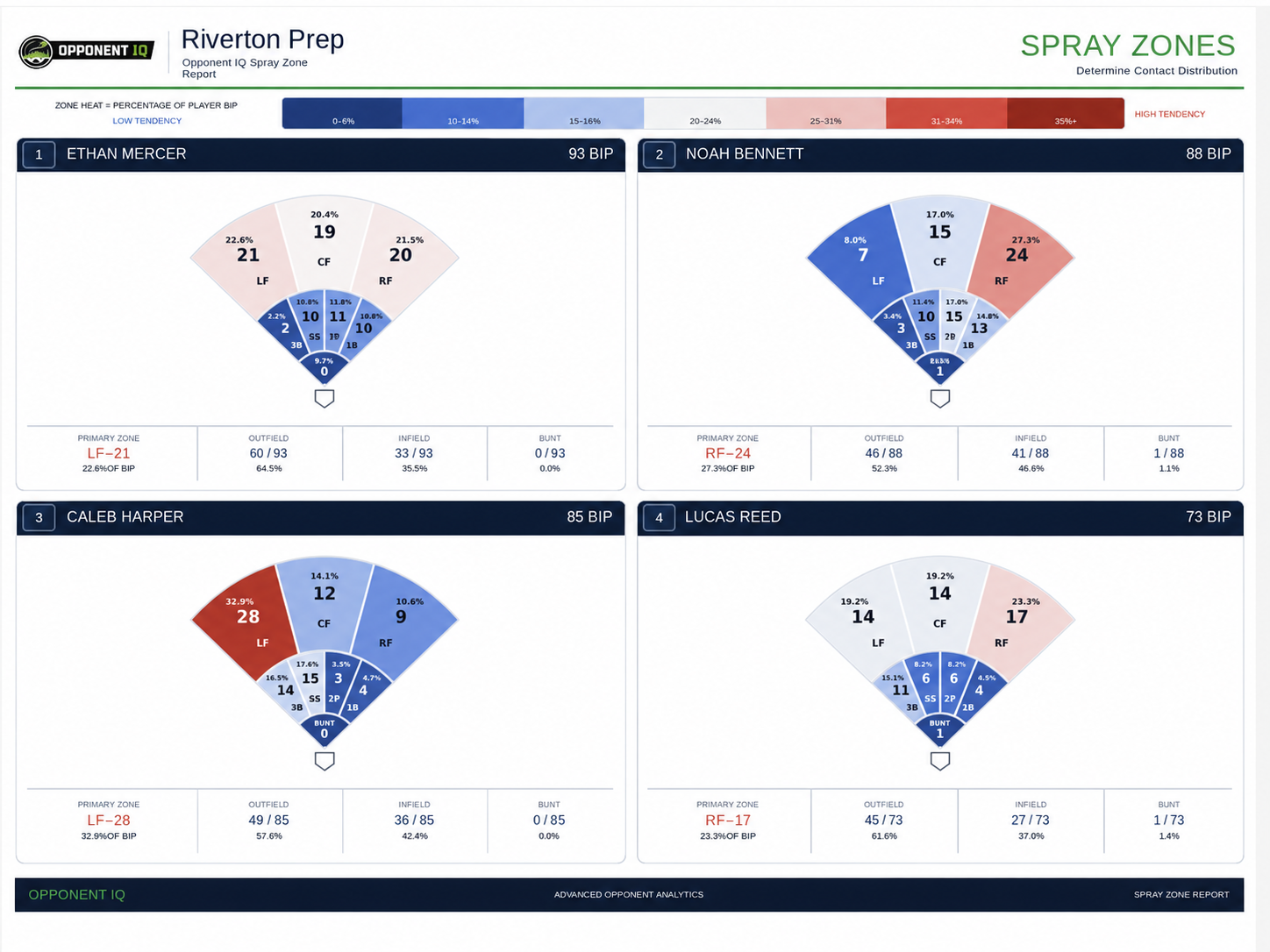
Spray Zone Reports
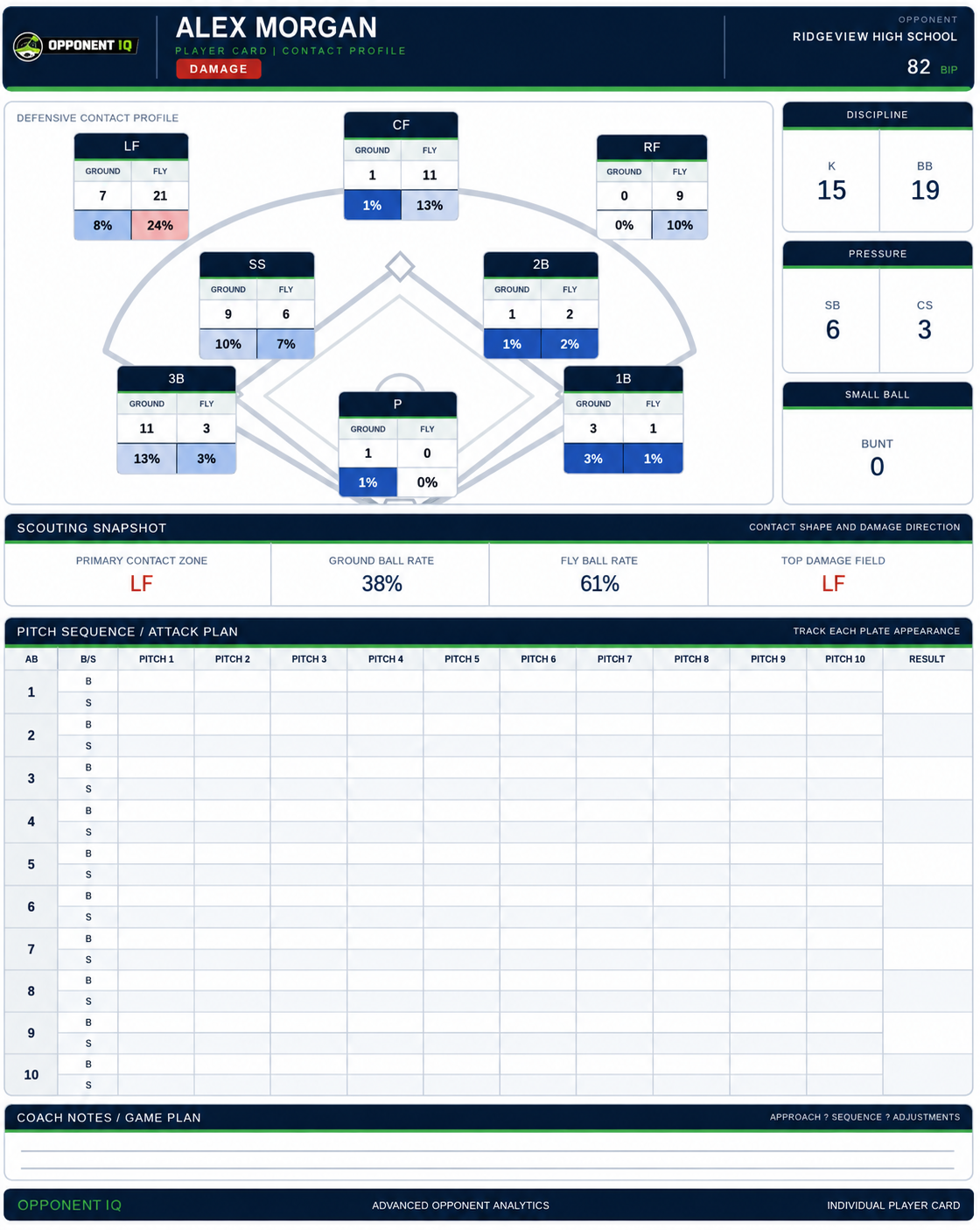
Player Cards
Swing Decision Reports
Extract Roster
Unlimited Opponents
IQ Capture — speeds up game processing
Pitching data & scout reports
My Team IQ — self-scout your own team
IQ Prospects — you choose who college coaches see
Player Development Plans
No AI suggestions — the coach decides
Report Examples
See What Opponent IQ Pro Produces
Printable, data-driven scouting reports — the coach makes the calls.
Season Summary
Damage Report
Spray Zones
Player Cards
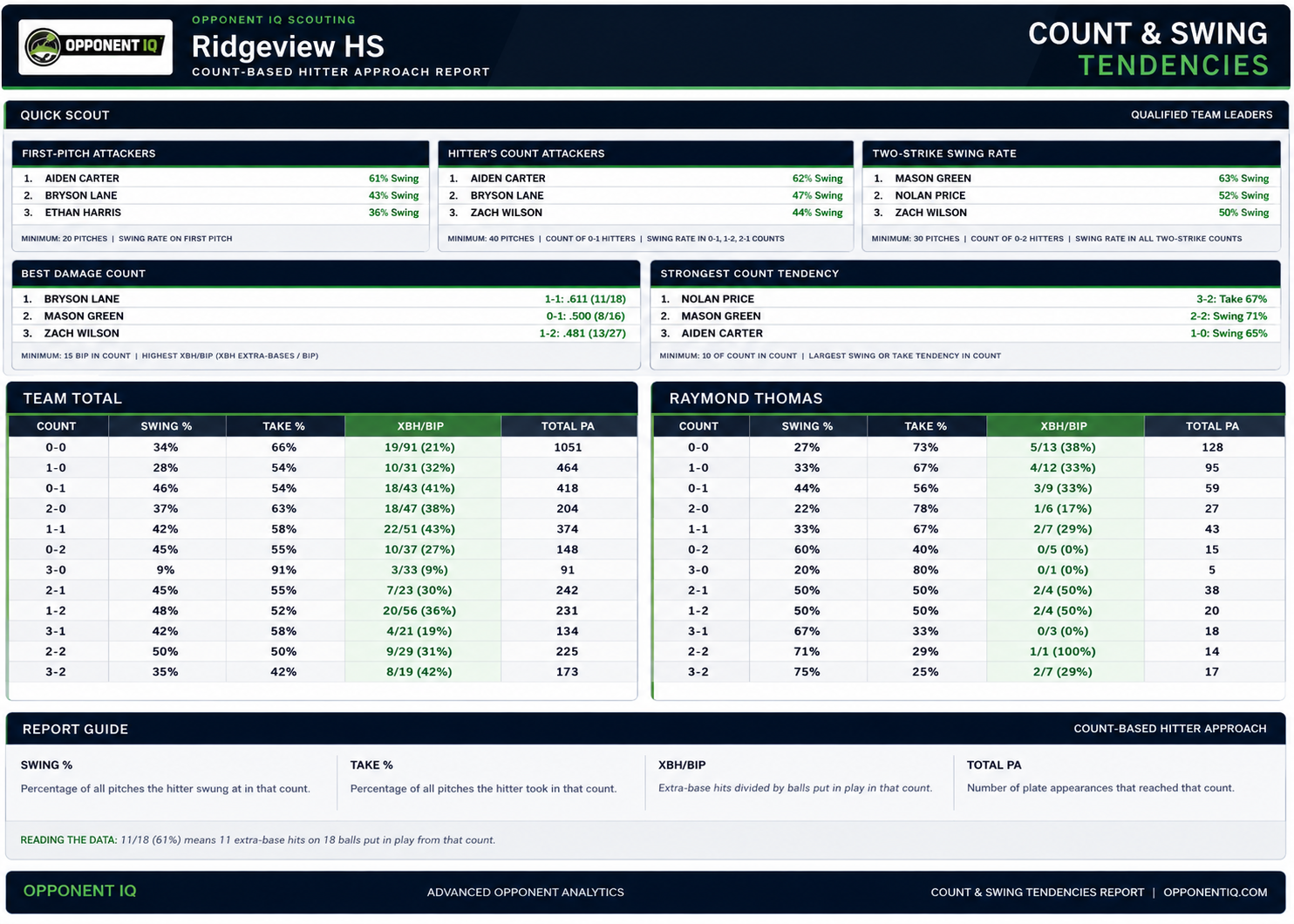
Swing Decisions
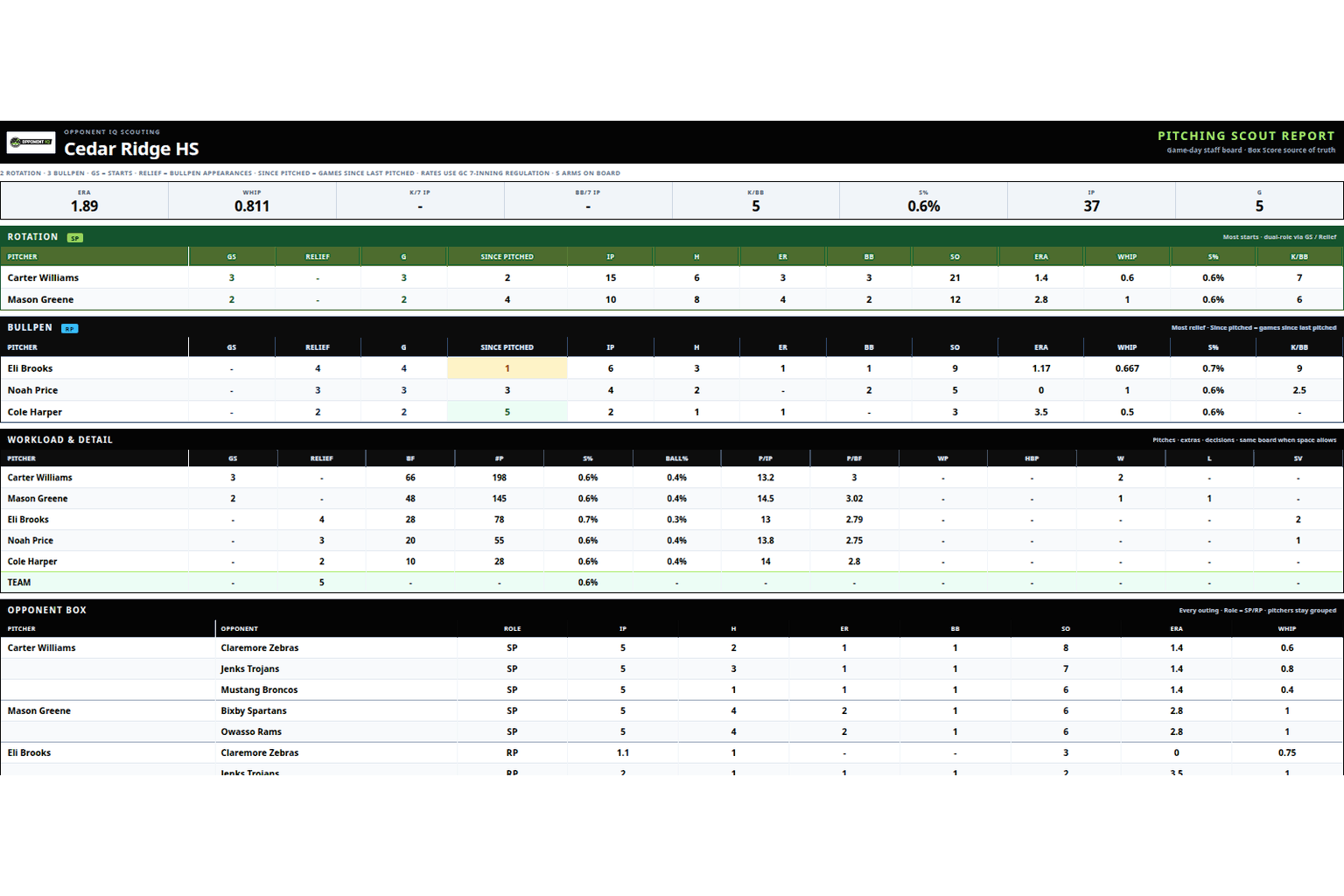
Pitching Scout Report
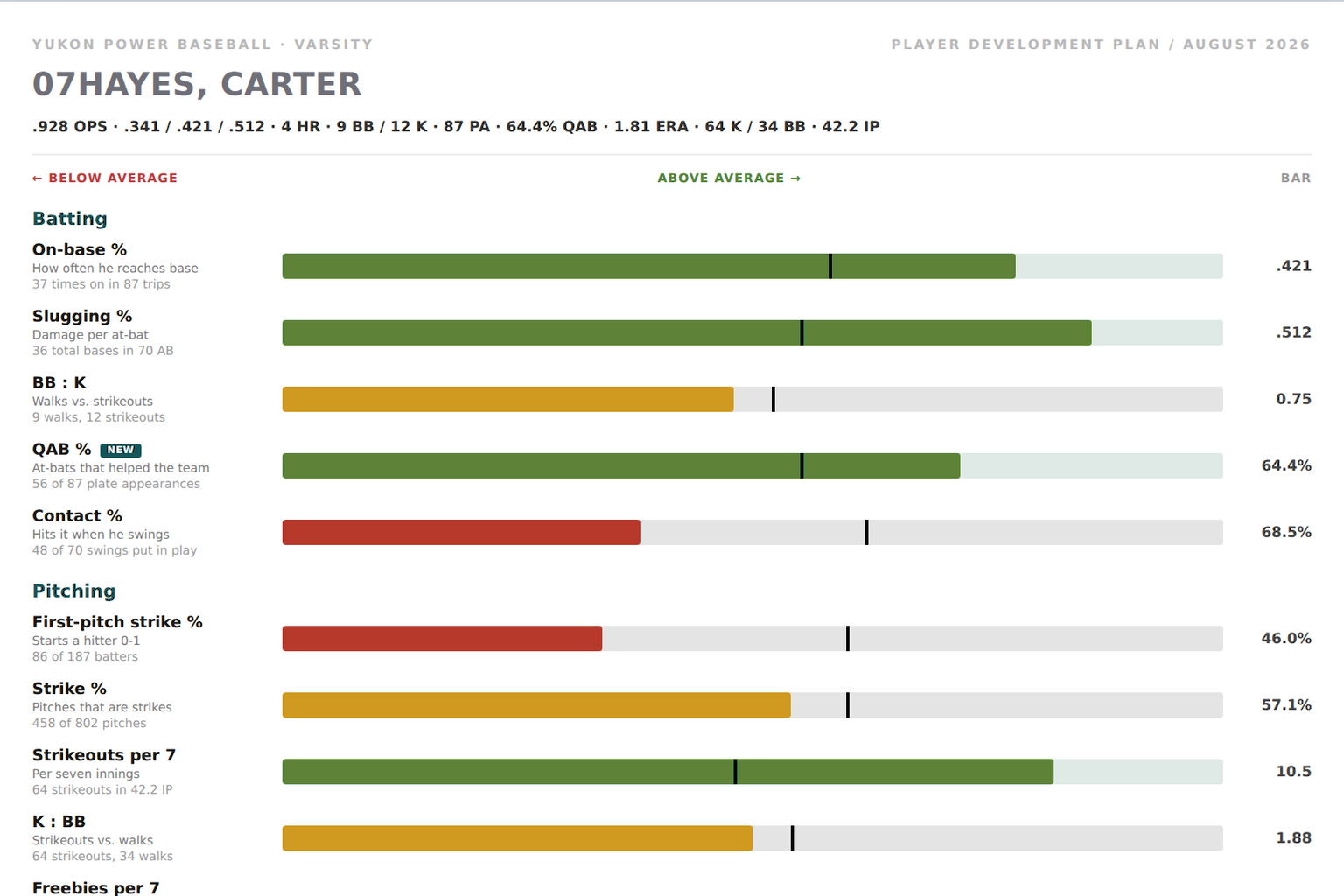
Player Development Plan
Terms of Use
Your team must accept the current version before entering the app.
Review and accept the Terms of Use to continue.
Current Opponent
No opponent selected
0
Games Processed
•
0
Players
Team Snapshot
BIP
0
Balls in play
K
0
Strikeouts
BB
0
Walks
SB
0
Stolen bases
CS
0
Caught stealing
BUNT
0
Bunt balls in play
XBH
0
Extra-base hits
IQ Capture
Capture Workflow
Capture once. Land where you are.
IQ Capture is how you bring Box Score and Plays into Opponent IQ.
You open the scorecard page you already use, click Capture, and it copies
the game text you can already see into Processing. Nothing auto-runs —
Extract Roster, then click Process Game.
Assisted copy only — not scraping.
Capture runs in your browser, only when you click Capture, on pages you already opened.
Opponent IQ does not log into scorecard apps for you or pull games in the background.
Pin IQ Capture to the toolbar after you install it. Pasting into the Game box is backup only, if Capture is not on that page.
Add a team, install IQ Capture, and process your first games in Opponent IQ Pro.
▶
Tutorial 1Coach Aguirre
Getting Started
Add a team, download IQ Capture, and process games end to end.
▶
Tutorial 2Coach Gelnar
My Team IQ
Self-scout your roster: CSV upload, bats, Development Reports, and own-team exports.
▶
Tutorial 3Coach Phillips
IQ Prospects
Share available players from My Team IQ so college coaches can hunt your list.
?Help
Opponent IQ Support
Help Center
Answers for setup, IQ Capture, Processing, Pitching, My Team IQ, Offseason Intrasquads, IQ Prospects, reports, and exports.
Where do I start as a new coach?
Open the written New Coach Guide (no login required), or watch the new coach guide video — the same Capture-first steps. In the app: pin IQ Capture, add an opponent with the scorecard name, open Processing, Capture Box Score and Plays, click Extract Roster after each game, Save Roster when a player is new, then Process Game. Every program gets a short in-app walkthrough on each sign-in until you turn it off.
How do I sign in?
Sign in with your team code (from the welcome email) or your school name, plus your password. If sign-in fails with a connection error, wait a few seconds and try again — the app retries automatically. Still stuck? Contact your program admin or Opponent IQ support at admin@opponentiq.net.
What is included in Opponent IQ Pro?
Opponent IQ Pro is $399.99/year for one program license. One annual seat covers your entire baseball or softball staff. You get IQ Capture, opponent Processing (Extract Roster, Process Game), Reports (Season Summary, Damage Table, Spray Zone, Player Scout, Pitching, Lineup Intelligence, Count & Swing Tendencies), Exports (PDF and Excel), My Team IQ including Offseason Intrasquads, and IQ Prospects. There is no separate Standard plan. If Capture, Pitching, My Team IQ, or IQ Prospects is missing, contact support at admin@opponentiq.net.
How do I add a new opponent?
From the sidebar, click Add Opponent and type the school the way it appears on the scorecard — not a nickname or abbreviation. Opponent IQ uses that name to match the game text. Select them, then Capture, Extract Roster, and Process on the Processing page.
Do I need a roster before processing a game?
Click Extract Roster after each game so substitutes and new starters are on the list. Save Roster on the first game for that opponent, then only if Extract added a player who was not already listed. If names don’t match the scorecard, stats can land on the wrong player or not appear at all.
What’s the fastest way to build a roster?
Capture the game first, then click Extract Roster. It pulls names and #10-style numbers from the Game text. Review spellings, then Save Roster the first time — and again only when a new player appears.
How do I process a game?
Open Processing, select the opponent, Capture Box Score and Plays with IQ Capture, click Extract Roster after that game, Save Roster if a player is new, then click Process Game. Check Reports to confirm numbers populated. If they didn’t, it is usually a naming issue on the opponent or roster. Paste into the Game box only if Capture is not on that page.
What is IQ Capture?
IQ Capture is how you bring games into Opponent IQ. Install it from the Dashboard card, pin it to the toolbar, open a scorecard page you already use, and click Capture. It copies Plays / Box Score into Processing. It does not scrape in the background or process until you click Process Game. Pasting play-by-play is backup only.
Which browsers work with IQ Capture?
Chrome is supported today. Edge can use the Chrome Web Store listing. After install, pin IQ Capture from the puzzle-piece Extensions icon so it stays on the toolbar. Safari is marked Coming Soon until a store listing is available. Capture only works on supported scorecard sites shown in the IQ Capture card.
What is College scorecard capture?
College scorecard capture is IQ Capture on supported college athletics box score / play-by-play pages. Capture both the Plays and Box Score sections, then Extract Roster after the game, Save Roster if a player is new, and Process Game.
Do I need both Play-by-Play and Box Score for college games?
Yes whenever both are available. Plays drive spray, BIP, and swing tendencies. The box fills pitching staff, decisions, and many counting stats. Missing either section is the most common reason college Process looks incomplete.
Box Score and Play-by-Play are on different tabs — what should I do?
Open each tab on the scorecard page and Capture so both sections are included. If a tab click does not register, refresh the page, open the tab again, and Capture. Use the newest IQ Capture version from the Dashboard card when possible.
What’s the difference between high-school Capture and college scorecard Capture?
High school and travel live scorekeeping usually includes richer pitch-by-pitch detail. College athletics scorecards vary by school site: some include pitch letter strings, some only print total pitches (NP). Opponent IQ still builds scouting reports either way, but Swing Decisions and strike % are only as complete as the source text.
Should I Extract Roster on college games?
Yes — after each game, so substitutes and new starters (DH/PH) make the list. Extract Roster pulls batting names from the Capture. Save Roster on the first game, then only if a new player was added.
What does “Game saved with warnings” mean?
The game was saved, but Opponent IQ spotted something to review before you coach off it — for example BIP that doesn’t line up with the box, or pitchers with pitch totals but no strike %. Yellow means review; red means don’t trust until you Undo and fix roster/source issues.
Do all college games need to process green?
No. Warnings are normal on college sources when the scorecard is incomplete (for example NP with no pitch letters). Use green/yellow/red as a trust signal: green is clean, yellow is review, red means Undo and fix before coaching.
What does “BIP vs box estimate” mean?
Opponent IQ compares balls in play from the play-by-play to a box estimate (AB − strikeouts + sacrifice hits/flies). A gap usually means a play wording wasn’t counted, a half-inning filter issue, or a roster miss. Spot-check spray for that game before heavy defensive prep.
Why do some pitchers show #P but blank S%?
Many college boxes print total pitches (NP) without a pitches-strikes split. When play-by-play includes pitch letter strings like (2-1 BBF), Opponent IQ can fill S%. When letters are missing or too sparse, #P still shows and S% stays blank instead of inventing a fake percentage.
Why does season S% look lower than individual games?
Season #P includes every outing with a pitch total. Season S% / Ball% only use outings that had a real strike split. Games with NP only do not dilute strike percentage — so #P can be high while S% still reflects the games that actually recorded strikes.
Do I need to reprocess my whole college season after a fix?
Usually no. Season pitching reports rebuild from saved games, and many fixes apply on the next Reports refresh. Reprocess a specific game only when that game’s warning is about missing roster names, incomplete capture, or a play you still don’t trust.
Why don’t Spray Zone location counts add up to BIP?
BIP is total balls in play (same as Season Summary). The field chart only shows balls with a usable location (LF/CF/RF, infield spots, bunt). Unlocated contact and pitcher/catcher spray still count in BIP but do not appear as zone dots, so zone counts can be lower than BIP.
Why don’t spray zone percentages add to 100%?
Zone heat uses BIP as the denominator so Spray Zone matches Season Summary. If some BIP has no location, the visible zone percentages intentionally sum to less than 100%.
Why is college spray thinner than some high-school scorecards?
College play-by-play often omits hit location or uses shorter outcome wording. Opponent IQ only maps contact when the text gives a usable direction. Fewer locations means thinner spray — not missing season BIP.
Can I coach off a yellow warning game?
Use judgment. Yellow means review the flagged item first (BIP/spray or pitching S%). If the warning is a known source limit (blank S% with no pitch letters), the rest of the report can still be useful. Red means Undo and fix before coaching.
Why didn’t a player’s stats show up?
Almost always a roster mismatch. Compare the roster name/number to the play-by-play spelling (including #10 style). Fix the roster, undo the last game if needed, then reprocess. Incomplete pasted text can also drop plate appearances.
Can I undo a game I processed by mistake?
Yes. Use Undo Last Game on that opponent to remove the most recent processed game from the season totals, then process the correct text if needed.
What does Reset Season do?
Reset Season clears season stats for the selected opponent. The saved roster stays in place so you can start fresh without retyping the whole team.
What reports can I pull?
Reports include Season Summary, Damage Table, Spray Zone, Player Scout, Pitching, Lineup Intelligence, and Count & Swing Tendencies. Game Filters lets you choose which processed games count. Exports has printable PDFs and an Excel workbook for the selected opponent and checked games.
How should I use Season Summary, Damage Table, and Spray Zone?
Season Summary is the quick pregame snapshot of who puts the ball in play, walks, strikeouts, runs, and creates damage. Damage Table highlights extra-base power and where it goes. Spray Zone maps balls in play for defensive positioning. Player Scout is the one-hitter view (BIP, K/BB, GB/FB, bunt, XBH, directional profile).
What is Pitching?
Open Reports → Pitching after you process a game that included Box Score. The report covers rotation, bullpen, workload, and strike % (S%). Season S% only uses outings that recorded a real strike split. Export Pitching Report and Individual Player Pitching Cards from Exports.
What is Lineup Intelligence?
Lineup Intelligence reconstructs lineup usage, substitutions, and lineup tendencies from processed games. Open it on Reports, then generate the PDF from Exports for the staff meeting.
What can I export?
Open Exports with the same opponent selected. Files cover only the games checked on Reports: Season Summary, Damage Report, Spray Zone, Pitching Report, Individual Player Pitching Cards, Count & Swing Tendencies, Lineup Intelligence, and the Excel workbook. Stay on the page until Spray Zone and player cards finish (about 1–3 minutes).
How are swing decisions calculated?
Each plate appearance is tracked pitch by pitch from 0-0. At every count, Opponent IQ records balls, called strikes, swings and misses, fouls, and balls in play as event rates when that count was reached. Because multiple events can occur in one PA (especially with two strikes), percentages can exceed 100%. Fouls are counted once per plate appearance at each count. College scorecards without pitch-by-pitch strings may leave swing decisions thin or blank for that game.
Does Opponent IQ use AI or tell me what to call?
No. Opponent IQ organizes game data into stats, tendencies, and printable reports. It does not generate AI pitch calls, lineup recommendations, or coaching advice. You still make the decisions.
Does Opponent IQ scrape scorekeeping apps?
No. Opponent IQ does not scrape third-party sites or run bots. IQ Capture is how you bring games in — a click-to-copy helper that only reads a page you already opened after you click Capture. Pasting into Processing is backup only. Opponent IQ is an independent product and is not affiliated with scorekeeping or streaming apps.
What is My Team IQ?
My Team IQ is own-program development, separate from opponent scouting. In the sidebar, open My Team IQ. Go to Process My Team Data, drop the season CSV (or college PDF), then click Process CSV / PDF. The file name is the season name. Then open Players, Development Report, and Exports. Use IQ Capture on your own scorecard to add spray one game at a time, or paste play-by-play as backup.
What is Offseason Intrasquads?
Offseason Intrasquads is included in Opponent IQ Pro. It is a second My Team IQ desk for fall, winter, and summer work. Open My Team IQ → Process My Team Data. Next to Sport, set Games to Offseason Intrasquads. That file is separate from in-season Team 1 / 2 / 3. Process both clubs onto one roster. Same last and first stay one player. Switch Games back to In Season Games anytime — the regular season file stays put.
What is IQ Prospects?
IQ Prospects is the college hunt. College coaches see only the kids a program adds. Open it from My Team IQ (Open IQ Prospects). High school season files can add available players. College PDF seasons can view the list and sign in, but cannot add players from those files.
How do I add a player to IQ Prospects?
On My Team IQ → Players, set Grad, Pos, Bats, and Throws, then click Share. That puts the player on IQ Prospects. Click Shared to take them off. Add available kids only — leave committed kids off. The season file is the line. Kids drop off IQ Prospects on July 20 of their grad year.
Can more than one coach use our school account?
Yes — staff can share the school team code and access code. Treat the access code like a password and only share it with trusted coaches on your staff.
What if processing fails or something looks wrong?
Confirm the opponent name matches the scorecard, Capture included Plays and Box Score, and you clicked Extract Roster after that game. If Reports look empty, it is usually a naming issue on the team or roster. Try Undo Last, fix the name, Save Roster if a player is new, then reprocess. If it still fails, note the opponent name and what you captured, then contact support.
Opponent IQ
Processing
OpponentNo opponent selected
Last gameNone yet
Updated—
Games0
Ready
Workbench
Game → Roster → Process
Capture first, extract the roster, then process once.
Step 1
Play-by-play
Capture packageSource —Plays —Box Score —Match —
Step 2
Names / #s
Status
Ready to process.
Danger ZoneReset season totals or delete this opponent
Reset clears processed games and season totals only. Delete removes the selected opponent completely from your team list.
Opponent IQ Scout Workspace
Reports Center
Fast scouting review for team tendencies, damage profiles, player reports, and game filters.
Current Opponent
No opponent selected
Scout Mode
Full Season
No games loaded
Team Snapshot
Quick Tendencies
High-level totals for fast pregame review.
BIP
-
Balls in play
XBH
-
Extra-base hits
K
-
Strikeouts
BB
-
Walks
SB
-
Stolen bases
CS
-
Caught stealing
BUNT
-
Bunt balls in play
TEAM LEADERS
Season Summary
Player Totals
Full opponent breakdown by player.
Player
No player totals found.
Damage Report
Extra-Base Hit Profile
Identify who can hurt you and where the damage goes.
Player
No damage data found.
Pitching Scout Report
Selected Team Pitching
Selected staff only · rotation, bullpen, and games since last pitched.
IP
-
Innings pitched
ERA
-
7-inning ERA
WHIP
-
Walks + hits / IP
K/7 IP
-
Strikeouts per 7 IP
K/BB
-
Strikeouts / walks
S%
-
Strikes / pitches
K%
-
SO / batters faced
Rotation SP
Sorted by most starts · GS = starts · Relief = games from the bullpen · Since pitched = games played since last pitched
Pitcher
GS
Relief
G
Since pitched
IP
H
ER
BB
SO
ERA
WHIP
TBIP
S%
K/BB
No starters found.
Bullpen RP
Sorted by most relief apps · GS = any starts · Relief = bullpen appearances · Since pitched = games played since last pitched
Pitcher
GS
Relief
G
Since pitched
IP
H
ER
BB
SO
ERA
WHIP
TBIP
S%
K/BB
No relievers found.
Workload & Detail
Pitcher
GS
Relief
BF
#P
S%
Ball%
P/IP
P/BF
WP
HBP
W
L
SV
No pitching data found. Process an IQ Capture with Box Score to populate this report.
Player Scout
Individual Player Report
Select a player and review their scouting tendencies.
GP
-
Games played
BIP
-
Balls in play
K / BB
-
Strikeouts / Walks
SB / CS
-
Stolen / Caught
GB%
-
Ground-ball rate
FB%
-
Fly-ball rate
BUNT
-
Bunt balls in play
XBH
-
Extra-base hits
GB Directional Profile
P
-
1B
-
2B
-
3B
-
SS
-
LF
-
CF
-
RF
-
FB Directional Profile
P
-
1B
-
2B
-
3B
-
SS
-
LF
-
CF
-
RF
-
Game Filters
Game Filters
Include games in reports/exports, or permanently delete selected games and their data.
No processed games found.
Opponent IQ Reports
Export Center
Create professional scouting files for the selected opponent. Reports reflect the game selection from the Reports workspace.
Current Opponent
No opponent selected
Export Status: Ready
Export Library
Reports
Workbook
Data Export
Exports include only games selected on the Reports page.
Choose a team, add hitters, then preview or download the scouting sheet.
Select an opponent to load the roster.
Sections to include
PDF Preview
Add hitters, then click Preview.
The scouting sheet preview will show here.
Gameday
Defense Position Cards
0 battersNot saved yet
Lineup
Drag to reorder · Bench ↔ Nine
Defensive Calls
Select a batter from the lineup.
Batter
Quick set
Positioning
STD = first pitch · 2K = two strikes · ★ = hot
StandardWith 2K
Call codes & batter tools
Call codes
Print Preview
Select an opponent with processed games.
Spray zones load with the opponent season.
Control Tower
Admin Workstation
Schools, licenses, access codes, signups, and IQ Capture beta — YUKON owner station only.
Locked
Enter the admin code to unlock admin tools.
API: idle
Schools
—
Active Licenses
—
Expiring ≤30d
—
Pending Signups
—
Capture Beta
—
Export Downloads
—
Export Downloads
Most downloaded export first. Counts start after this ships.
Rank
Export
Downloads
Opponent
My Team
Schools
Last download
Unlock to load export ranking.
School Directory
Search, inspect, and manage live accounts
School
Code
Account
License
Plan
Unlock to load schools.
Selected School
None selected
Select a school from the directory.
Create School
Manual provision · initial access code = team code
Reset Access Code
Coach login password / access code
Branding
Uses selected school team code
Pending Signups
Stripe checkout queue · abandoned and blocked rows
School
Code
Email
Status
Sales
Created
Action
Unlock to load signups.
My Team IQ
Player Development
Season rates, spray, and development plans for your roster.
Offseason deskOne roster. Intrasquad takes both clubs. Scrimmage, alumni, and midweek only credit the program list.
Active Season
No season loaded
Sport
Stamps the state list. Not inferred from the school name.
Season CSV
Not Loaded
Upload under Process My Team Data
Season Snapshot
Development Desk
Rates from this season’s CSV.
Players
0
From latest season CSV
CSV
Not loaded
Source of truth for rates
Updated
—
Last season data write
Program evaluation
Who is producing
Two-strike ready from Plays.
True intra takes both clubs onto one roster. Scrimmage, alumni, and midweek only credit names on your program list.
Players
0
On the one program roster
Games
0
Contests processed
Last game
None yet
On the program file
Plate
Hitting
Full board. OPS, vs L/R, and the side they wore.
Process an intersquad to rank hitters.
Mound
Pitching
Usage across the fall — G, outs, pitches, ERA.
Process an intersquad to rank pitchers.
Jobs
Depth by position
Process a box with LINEUP positions to stack jobs.
Fall file
Game log
No contests processed yet.
The path
How to use My Team IQ
Four moves. One desk. IQ Prospects is the last one.
Season
Games
Desk
IQ Prospects
01
Season
Load the file once.
The file name is the season name. Drop the CSV. Click Process CSV / PDF.
02
Games
Add spray one game at a time.
IQ Capture — open the scorecard, Capture, Send, then Process Game.
Or paste the play-by-play and Process Game.
Offseason work: set Games to Offseason Intrasquads. That is a separate file. Process both clubs onto one roster.
03
Desk
Finish the roster.
Set Bats. Read the report. Set the work.
04
IQ Prospects
College coaches see only the kids you add.
Set Grad, Pos, Bats, and Throws. Add available kids. Leave committed kids off. The season file is the line.